WordPress Block Plugin
Navigation Block Fully Unleashed
The WordPress Navigation block is powerful but locked down. Extended Navigation Block gives you hover colors, selected states, padding, spacing, typography, separators, and full mobile menu control — all from the block editor sidebar.
Scroll
14+
Color Controls
40+
Typography Options
0
Theme Conflicts
GPL
Licensed & Open
What’s Included
Every control you wished WordPress already had
Extended Navigation Block adds a full suite of styling controls to the native block editor sidebar — no custom CSS required, no page builders, no workarounds.

Top Level Hover Color
Set distinct text and background colors for top level items hover. Works across all themes.
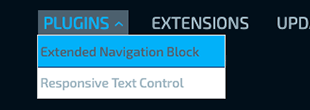
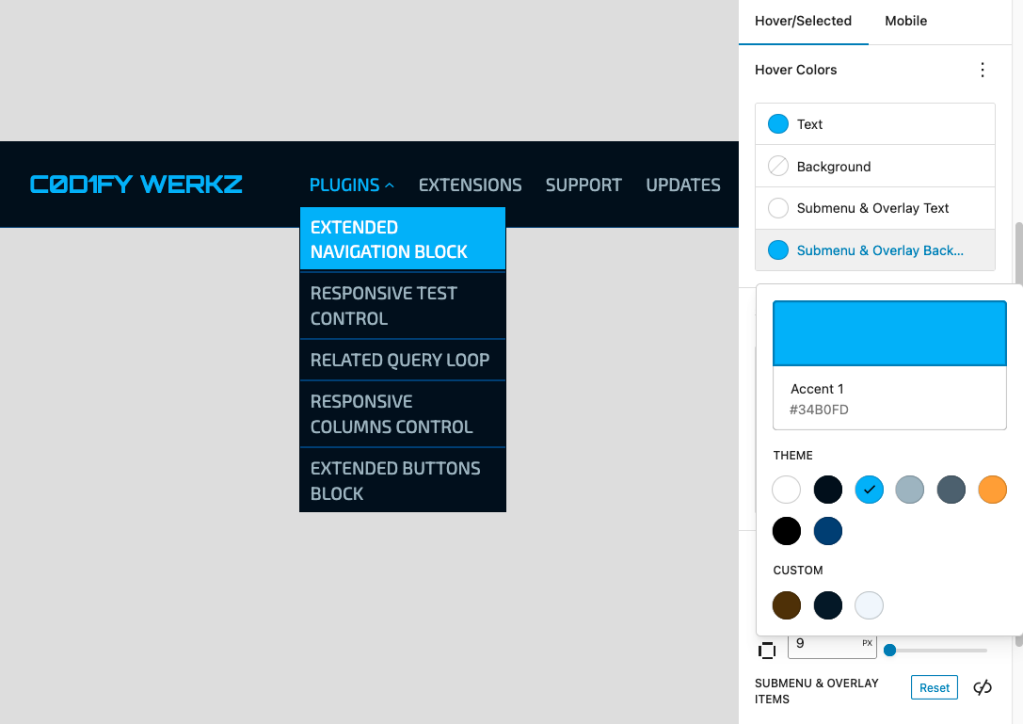
Submenu Hover Color
PRO
Set distinct text and background colors for submenu items on hover. Works across all themes.

Top Level Active Color
Style the current page’s top level nav item with its own color set — separate from hover.
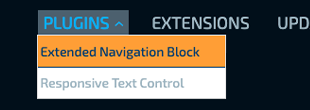
Submenu Active Color
PRO
Style the current page’s submenu nav item and any parent ancestors with their own color set — separate from hover.

Item Padding
PRO
Control padding on top level and submenu items independently using the familiar BoxControl from the block editor.

Top Level Item Spacing
Using the core Block spacing in Free and Pro, you can set gap between top level items.
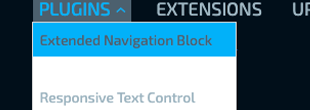
Submenu Item Spacing
PRO
Set gap between between submenu items with unit controls — px, em, rem, % all supported.

Top Level Separator
PRO
Add lines between top level items with its own color and thickness.
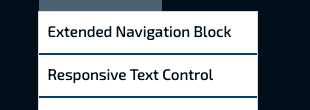
Submenu Separator
PRO
Add lines between submenu items with its own color and thickness.

Hover & Selected Typography
PRO
Font family, size, weight, style, line height, letter spacing, decoration, and transform — all controllable per state and per level.

Hover fade
Fades colors and borders in and out over 250ms, including submenus opening and closing.

Mobile Menu Styling
PRO
Set background, text colors, gap, sub-level indent, and full font controls for the mobile overlay menu independently.

Close Button Control
PRO
Style the mobile close button with its own colors, padding, margin, border, and border radius.

Item Borders
PRO
Full border control — color, style, width per side, and radius per corner — for top level and submenu items across normal, hover, and active states.
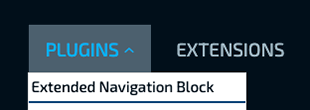
Parent with Submenu Colors
PRO
Distinct hover text and background colors only for items that open a dropdown — plain links are unaffected. Falls back to general hover colors when unset.

Top Level Full Width
PRO
Stretches each top level item to the full width of the menu (vertical only), This is useful for sidebars.

Live Editor Preview
All changes preview in real-time inside the Site Editor iframe — what you see is exactly what you get on the frontend.
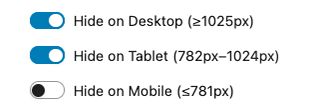
Responsive Visibility
Hide individual nav items on desktop, tablet, or mobile — independently per item. No duplicate menus needed. Submenu arrows auto-hide when all children are hidden on a breakpoint.
Why this exists
You’ve built a beautiful site Then someone hovers over the navigation
The fonts are right. The colors match the brand. The layout is exactly what was asked for. Then a link highlights in the browser’s default blue — because WordPress doesn’t give you hover states on the navigation block. Not without writing CSS yourself.
So you write the CSS. It works. A theme update ships and it breaks. You write it again. The client switches to a block theme. You write it a third time.
We wondered why a navigation block ships with almost no style controls. So we built them ourselves — directly into the block editor, saved with the block, immune to theme changes.
Pricing
Simple, honest pricing
Start free. Upgrade when you need the full toolkit.
Free
$0
Forever Free · WordPress.org
Upgrade to Pro at Any Time
- Hover text color (top level)
- Hover background color (top level)
- Selected text color (top level)
- Selected background color (top level)
- Top level spacing via block spacing
- Fade hover effects
- Responsive Visibility
- Live editor preview
- Automatic plugin updates
PRO
$49
/yr
Annual License · 1 Site · Updates Included
Multi-Site Options Available at Checkout
- Everything in Free
- Submenu & overlay colors
- Parent with submenu colors
- Item padding controls
- Separate submenu block spacing
- Separators (top level & submenu)
- Item borders (6 states)
- Hover & selected typography
- Full width vertical menus
- Mobile menu background & colors
- Mobile font controls
- Close button full styling
- Priority email support
FAQ
Common questions
Does this work with any WordPress theme?
Yes. The plugin extends the core Navigation block and works with any block-based or hybrid theme. It doesn’t modify theme files.
Will it conflict with my theme’s nav styles?
Unlikely. Styles are scoped to a unique ID per navigation block and use !important only where necessary to win specificity battles.
Does it require a page builder?
No. Everything lives in the native WordPress block editor sidebar. No Elementor, no Divi, no ACF — just WordPress core.
What WordPress version do I need?
WordPress 6.0 or higher. A block-based theme is recommended, but it works with hybrid themes that use the Navigation block.
Can I use the free version on client sites?
Yes — Pro requires a license per site to unlock Pro features, and includes updates and support. There are multi-site and agency Pro licenses available as well.
What’s included in priority support?
Pro customers get email support with a 48-hour response target. We help with configuration, CSS conflicts, and bug reports.
Ready to take control of your nav?
Start free today. Upgrade to Pro when you’re ready for the full toolkit.